All products

MyClinicFlo: For clinics using OSCAR

A connected front desk for OSCAR clinics: online booking, Bea on calls and texts, appointment changes, recall and cancellation filling, with a staff workspace tied to the clinic’s calendar.

Clinic connection and authorization are required. The clinic controls appointment actions and patient messaging.
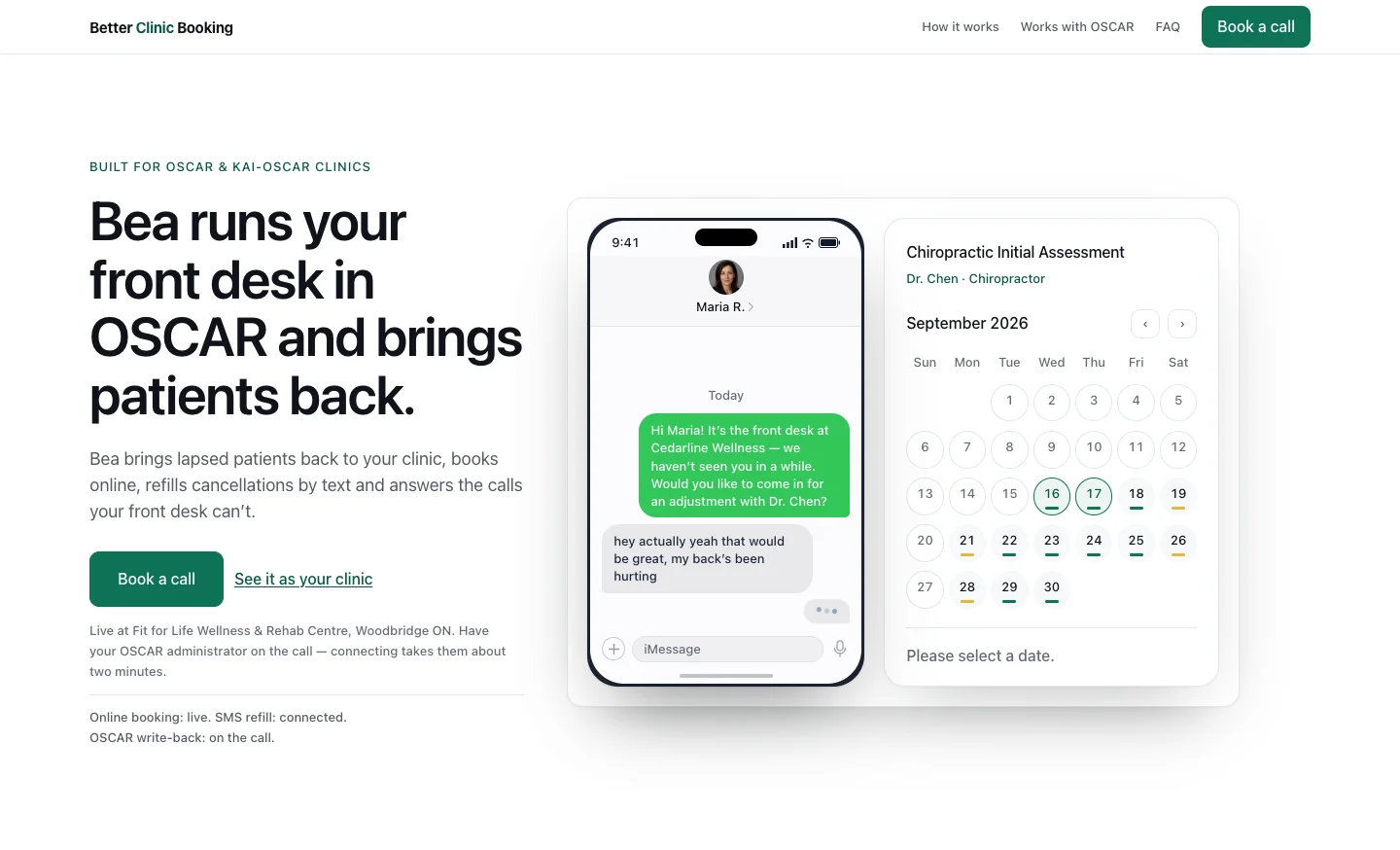
MyClinicFlo product landing-page preview
Product website preview · November 2026.
All products

MyClinicFlo

MyClinicFlo: For clinics using OSCAR

  • Patient
  • Bea
  • Clinic owner
  • Staff
  • Clinic
  • Recall service
  • Booking assistant
  • Filling service
  • Clinic calendar
  • Clinic staff
  • Booking service
  • OSCAR
  • Front desk
  • Follow-up service

A connected front desk for OSCAR clinics: online booking, Bea on calls and texts, appointment changes, recall and cancellation filling, with a staff workspace tied to the clinic’s calendar.

Clinic connection and authorization are required. The clinic controls appointment actions and patient messaging.

The workflow

Follow every branch. Select a heading to trace its connections.

Online, phone and text → Identify the patient and request (Booking or appointment change); Online, phone and text → Staff desk and takeover (Needs a person); Identify the patient and request → Find a suitable appointment (Verified patient); Identify the patient and request → Staff desk and takeover (Ambiguous or unavailable); Find a suitable appointment → Approve the exact change (Selected time or existing visit); Find a suitable appointment → Staff desk and takeover (No suitable result); Approve the exact change → Find a suitable appointment (Choose another option); Approve the exact change → Save and verify the calendar change (Exact change approved); Save and verify the calendar change → Confirmation and staff visibility (Saved result verified); Save and verify the calendar change → Staff desk and takeover (Not authorized or result uncertain); Confirmation and staff visibility → Staff desk and takeover (Visit and conversation visible); Confirmation and staff visibility → Reminders and missed-visit follow-up (Eligible visit); Confirmation and staff visibility → Waitlist and cancellation filling (A cancellation frees a slot); Recall and lapsed-patient outreach → Clinic-controlled outreach; Waitlist and cancellation filling → Clinic-controlled outreach; Reminders and missed-visit follow-up → Clinic-controlled outreach (Enabled follow-up program); Clinic-controlled outreach → Invitations, offers and replies (Permitted outreach); Invitations, offers and replies → Find a suitable appointment (Interested in booking); Invitations, offers and replies → Approve the exact change (Offered slot still available); Invitations, offers and replies → Waitlist and cancellation filling (Expired, taken or declined offer); Invitations, offers and replies → Clinic controls and reporting (Delivery and return results); Invitations, offers and replies → Clinic-controlled outreach (STOP updates permission); Clinic controls and reporting → Find a suitable appointment (Clinic booking settings); Clinic controls and reporting → Recall and lapsed-patient outreach (Enabled recall program); Clinic controls and reporting → Clinic-controlled outreach (Clinic authorization); Staff desk and takeover → Identify the patient and request (Staff resolves request); Clinic controls and reporting → Shape the patient booking experience (Configure patient experience); Shape the patient booking experience → Online, phone and text (Published booking page); Shape the patient booking experience → Find a suitable appointment (Services and availability); Staff desk and takeover → Desk booking and appointment management (Staff manages a visit); Desk booking and appointment management → Save and verify the calendar change (Supported confirmed action); Desk booking and appointment management → Staff desk and takeover (Needs OSCAR check or resolution); Online, phone and text → Join the waitlist for an opening (Wants a future opening); Find a suitable appointment → Join the waitlist for an opening (No suitable time); Join the waitlist for an opening → Waitlist and cancellation filling (Eligible matching candidate); Confirmation and staff visibility → Ask for a review after a visit (Eligible ended visit); Ask for a review after a visit → Clinic-controlled outreach (Separate clinic opt-in and send rules); Ask for a review after a visit → Clinic controls and reporting (Recorded review-request outcome).

  1. Patient and Bea

    1. Start from the online booking page, a phone call or a text.
    2. Ask about the clinic, request an appointment or get help with an existing visit.
    3. Use clinic-approved information for ordinary questions.

    Patients can use the channel that suits them while the clinic controls what Bea can answer.

    • Booking or appointment change
    • Needs a person
    • Wants a future opening
  2. Clinic owner and staff

    1. Set practitioner availability, services, prices and closure dates.
    2. Choose booking fields, visit questions and patient-facing policies.
    3. Preview the page with the clinic’s branding and practitioner information.
    4. Publish reviewed page changes.

    The clinic configures what patients can book and how the booking page presents it.

    • Published booking page
    • Services and availability
  3. Clinic and recall service

    1. Identify patients due back using permitted current facts.
    2. Prepare an audience and relevant invitation.
    3. Let the clinic review and control its recall program.

    Recall connects existing patient relationships back to booking.

  4. Patient and booking assistant

    1. Verify the patient before accessing their appointments.
    2. Identify whether they want to book, move or cancel a visit.
    3. Send ambiguous, unsupported or person-needed requests to the desk.

    Appointment-specific actions start with the correct patient and a clear request.

    • Verified patient
    • Ambiguous or unavailable
  5. Clinic owner and staff

    1. Set approved clinic facts, hours, services and booking options.
    2. Choose the phone-answering mode and staff handoff settings.
    3. Control recall, filling and follow-up programs.
    4. Review delivery, returns and operation summaries.
    5. Maintain clinic-authored saved replies and approved answers for common patient questions.

    The clinic controls how the front desk operates and can inspect its outcomes.

    • Clinic booking settings
    • Enabled recall program
    • Clinic authorization
    • Configure patient experience
  6. Patient

    1. Ask to hear about suitable cancellation openings.
    2. Provide the requested service and contact preferences.
    3. Wait for a permitted offer that still needs a current availability check.

    A waitlist request feeds the cancellation-filling branch; it is not itself a booked visit.

    • Eligible matching candidate
  7. Clinic and filling service

    1. Identify newly available appointment capacity.
    2. Match eligible patients to the service, practitioner and visit length.
    3. Prepare a suitable waitlist or opening offer.

    A freed appointment becomes a targeted opportunity rather than an assumed booking.

  8. Booking assistant and clinic calendar

    1. Use the clinic’s services, practitioners, visit lengths and booking policies.
    2. Check current appointment availability.
    3. Let the patient select a suitable time.
    4. Read the existing visit before proposing a move or cancellation.

    New bookings and moves use actual clinic availability; cancellation starts from the verified existing visit.

    • Selected time or existing visit
    • No suitable result
    • No suitable time
  9. Clinic staff

    1. See the schedule, current visits, messages and attention requests.
    2. Take over the conversation when a person is needed.
    3. Resolve identity, booking or uncertain-outcome issues before continuing.
    4. Separate conversations needing a reply, callbacks, appointment requests and failed texts from completed conversations.

    Staff can step in without treating an unverified action as completed.

    • Staff resolves request
    • Staff manages a visit
  10. Clinic staff

    1. Review the program’s wording, audience and outreach limits.
    2. Explicitly enable the relevant patient-sending program.
    3. Respect consent, quiet hours and contact limits.
    4. Hold ineligible or disabled outreach.

    Clinic permission and patient messaging rules still apply after an audience is prepared.

    • Permitted outreach
  11. Patient

    1. Show the proposed booking, move or cancellation.
    2. Ask the patient to approve that specific change.
    3. Return to the conversation if they want a different option.

    A proposal is not a completed appointment change.

    • Choose another option
    • Exact change approved
  12. Clinic staff

    1. Use the day or week schedule to see practitioners, visits and openings.
    2. Book a verified patient into an available time.
    3. Move or cancel a supported appointment with the required confirmation.
    4. Resolve pending or uncertain booking outcomes after checking the clinic calendar.

    Staff can manage supported appointments from the desk; appointments that require an OSCAR action stay with that workflow.

    • Supported confirmed action
    • Needs OSCAR check or resolution
  13. Patient and Bea

    1. Deliver a permitted invitation or appointment offer.
    2. Handle interest, questions, declines and STOP replies.
    3. Recheck an offered slot before continuing into booking.
    4. Return expired or taken offers to the next eligible opportunity.

    A positive reply starts the relevant booking steps; it does not bypass approval or availability.

    • Interested in booking
    • Offered slot still available
    • Expired, taken or declined offer
    • Delivery and return results
    • STOP updates permission
  14. Booking service and OSCAR

    1. Check clinic authorization and enabled booking access.
    2. Recheck the visit, time and applicable policy.
    3. Save the approved change in the clinic’s calendar.
    4. Verify the result before claiming success.

    The clinic calendar remains the source of appointment facts.

    • Saved result verified
    • Not authorized or result uncertain
  15. Patient and front desk

    1. Confirm the known saved result to the patient.
    2. Show the visit and conversation to clinic staff.
    3. Keep an unresolved result with the desk for checking.

    The patient and desk receive a truthful view of what happened.

    • Visit and conversation visible
    • Eligible visit
    • A cancellation frees a slot
    • Eligible ended visit
  16. Clinic and follow-up service

    1. Identify visits eligible for an appointment reminder.
    2. Identify configured missed-visit follow-up.
    3. Apply the clinic’s approved timing, message and sending permissions.

    Follow-up uses the clinic’s enabled programs rather than an unrestricted promise to text.

    • Enabled follow-up program
  17. Clinic and patient

    1. Use the clinic’s separately enabled review-request program.
    2. Ask an eligible patient for a review using the clinic’s approved link.
    3. Avoid repeating a review request already recorded for that patient.
    4. Respect contact permission and quiet hours.

    Review requests are distinct from appointment reminders and no-show follow-up.

    • Separate clinic opt-in and send rules
    • Recorded review-request outcome

The result

A patient request or approved follow-up can become a verified appointment in the clinic’s own calendar, with staff able to take over.

What to know

Online booking, phone and text reception, staff appointment work, recall and cancellation filling connect to the clinic’s own calendar.

Patient self-service checks the request and confirmation before the calendar action. Authorized staff can manage supported visits and take over conversations.

The clinic controls its booking page, approved answers and separately enabled follow-up programs.