All products

Reliable Booking: For businesses whose clients come back

Turn customer history into a return-service plan, approved outreach, assisted booking and scheduler-confirmed changes, with attendance and payment evidence kept distinct from interest.

Outreach requires business approval, contact permission and enabled sending settings.
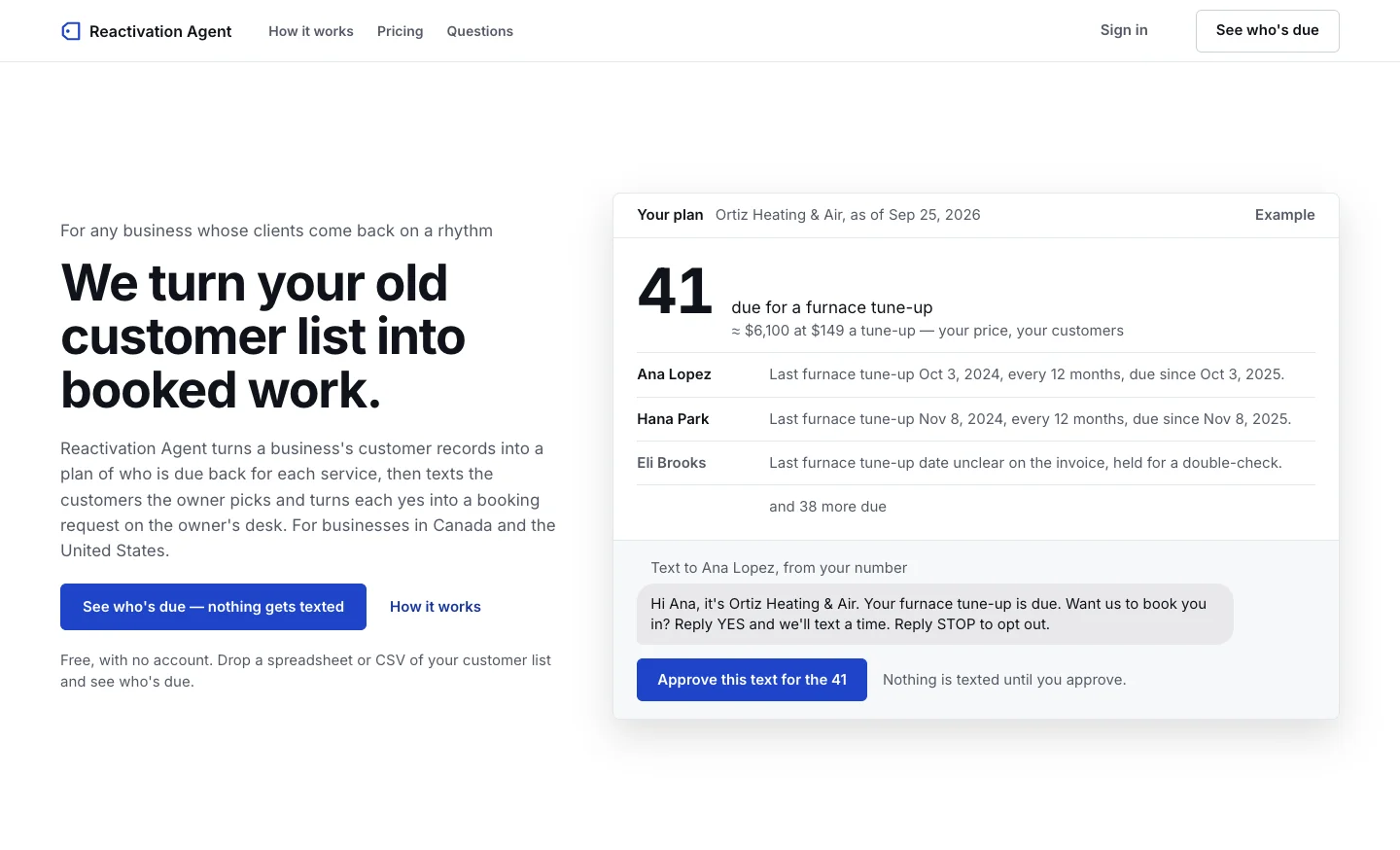
Reliable Booking product landing-page preview
Product website preview · November 2026.
All products

Reliable Booking

Reliable Booking: For businesses whose clients come back

  • Business owner
  • Reliable Booking
  • Owner
  • Messaging service
  • Customer
  • Owner desk
  • Business staff

Turn customer history into a return-service plan, approved outreach, assisted booking and scheduler-confirmed changes, with attendance and payment evidence kept distinct from interest.

Outreach requires business approval, contact permission and enabled sending settings.

The workflow

Follow every branch. Select a heading to trace its connections.

Import existing customer history → See who is due and why (Validated history); Set when customers should return → See who is due and why; Import existing customer history → Set when customers should return (Correction needed); See who is due and why → Draft the audience and message (Owner chooses outreach); Draft the audience and message → Approve the exact outreach; Approve the exact outreach → Draft the audience and message (Changed message or audience); Approve the exact outreach → Apply sending permissions and limits (Approved current revision); Approve the exact outreach → See who is due and why (Paused or excluded); Apply sending permissions and limits → Send the text and track its result (Permitted now); Apply sending permissions and limits → See who is due and why (Held until eligible); Send the text and track its result → Handle interest, questions and STOP (Customer responds); Send the text and track its result → Reply queue and manual follow-up (Uncertain delivery); Handle interest, questions and STOP → Arrange the return visit (Interested); Handle interest, questions and STOP → Reply queue and manual follow-up (Question or reply); Handle interest, questions and STOP → Apply sending permissions and limits (STOP or permission change); Arrange the return visit → Reply queue and manual follow-up (Needs desk confirmation); Reply queue and manual follow-up → Arrange the return visit (Staff arranges visit); Arrange the return visit → Track return work and the next cycle (Actual booking confirmed); Reply queue and manual follow-up → Track return work and the next cycle (Reply resolved); Send the text and track its result → Track return work and the next cycle (Known delivery outcome); Track return work and the next cycle → Import existing customer history (Updated completed-service history); Track return work and the next cycle → See who is due and why (Next return cycle); Import existing customer history → Review duplicate customer records (Possible duplicates); Review duplicate customer records → See who is due and why (Reviewed identity); Review duplicate customer records → Apply sending permissions and limits (Shared-number outreach held); Set when customers should return → Approve business facts and return rules (Owner-approved return rules); Approve business facts and return rules → Draft the audience and message (Approved services and exclusions); Approve business facts and return rules → Assisted booking conversation and alternatives (Approved administrative facts); Handle interest, questions and STOP → Assisted booking conversation and alternatives (Booking interest or clarification); Assisted booking conversation and alternatives → Handle interest, questions and STOP (Alternative or clarification reply); Assisted booking conversation and alternatives → Arrange the return visit (Scheduler-confirmed appointment); Assisted booking conversation and alternatives → Reply queue and manual follow-up (Staff handoff or follow-up); Arrange the return visit → Recorded changes and cancellations (Change or cancellation requested); Recorded changes and cancellations → Reply queue and manual follow-up (Staff handles scheduler action); Recorded changes and cancellations → Send the text and track its result (Updated confirmation or cancellation message); Arrange the return visit → Attendance, payment and refund evidence (Appointment outcome); Attendance, payment and refund evidence → Track return work and the next cycle (Evidence-backed counts and reconciliation).

  1. Business owner

    1. Upload the supported customer and service records.
    2. Map columns, service names and customer identities.
    3. Check ambiguous or conflicting history before using it.

    The workflow starts with the business’s own past customers and work.

    • Validated history
    • Correction needed
    • Possible duplicates
  2. Business owner

    1. Review possible duplicate records that share a phone number.
    2. Check both service histories before linking records as the same person.
    3. Keep different people separate and hold outreach when they share a number.
    4. Correct different-number duplicates in the original source records.

    Identity review protects the audience before a campaign is approved.

    • Reviewed identity
    • Shared-number outreach held
  3. Business owner

    1. Choose the return rhythm for each service.
    2. Add the business context needed for relevant outreach.
    3. Correct unclear service or identity matches.

    The business defines what being due means for its services.

    • Owner-approved return rules
  4. Reliable Booking and owner

    1. Use validated history and service rhythms to identify due customers.
    2. Show a reason for each selection.
    3. Hold unclear, excluded or already-booked customers.
    4. Let the owner inspect the plan before outreach.

    A reasoned due list is distinct from permission to send.

    • Owner chooses outreach
  5. Business owner

    1. Approve offered services, locations, staff and opening hours.
    2. Review recurring versus one-time services, return intervals and available prices.
    3. Set approved administrative answers and cancellation or payment policies.
    4. Choose exclusions and staff follow-up expectations.

    Assisted conversations and outreach use the business’s approved facts, not invented availability or policies.

    • Approved services and exclusions
    • Approved administrative facts
  6. Reliable Booking and owner

    1. Choose the customer group and service invitation.
    2. Prepare the campaign wording.
    3. Let the owner edit the message, pick customers and exclude people.
    4. Check the campaign plan is available for the business.

    A prepared campaign is still a draft.

  7. Business owner

    1. Review the current message and audience.
    2. Approve that campaign revision.
    3. Review again if the message or audience changes.
    4. Pause the campaign when needed.

    Approval belongs to what the owner actually reviewed.

    • Changed message or audience
    • Approved current revision
    • Paused or excluded
  8. Messaging service

    1. Use the business’s permitted sender.
    2. Respect consent, quiet hours and contact limits.
    3. Send only from an approved, unpaused campaign.
    4. Hold customers who are not currently eligible.

    Campaign approval does not bypass customer permission or sending rules.

    • Permitted now
    • Held until eligible
  9. Messaging service

    1. Deliver the permitted invitation.
    2. Record known delivery outcomes.
    3. Keep uncertain delivery visible for owner attention.

    A send attempt is not proof that the customer received or acted on it.

    • Customer responds
    • Uncertain delivery
    • Known delivery outcome
  10. Customer and owner desk

    1. Recognize customers interested in returning.
    2. Bring ordinary questions into the reply queue.
    3. Respect declines and STOP by updating permission.
    4. Track replies against the campaign.

    Each reply has a clear next route.

    • Interested
    • Question or reply
    • STOP or permission change
    • Booking interest or clarification
  11. Business staff

    1. Answer customer questions and resolve open replies.
    2. Check delivery uncertainty and requests needing a person.
    3. Mark replies resolved after the business has dealt with them.
    4. Take responsibility for staff follow-up and record the customer’s answer after phone, in-person or external-message contact.

    The desk makes the human handoff visible.

    • Staff arranges visit
    • Reply resolved
  12. Customer and business staff

    1. Collect or clarify the customer’s service, location, staff and time preferences.
    2. Offer an unreserved alternative when a requested time cannot be confirmed.
    3. Book in the business’s scheduler first, then record the confirmed details.
    4. Decline the request or hand it to staff when needed.

    An offered alternative remains unreserved; a recorded booking follows the actual scheduler.

    • Alternative or clarification reply
    • Scheduler-confirmed appointment
    • Staff handoff or follow-up
  13. Customer and business staff

    1. Use a supported booking link or the business’s offered-time workflow.
    2. Put booking requests needing confirmation in the owner desk.
    3. Have staff confirm the actual appointment in the business’s calendar.

    A positive reply can be a booking request; the business confirms the actual appointment.

    • Needs desk confirmation
    • Actual booking confirmed
    • Change or cancellation requested
    • Appointment outcome
  14. Business staff

    1. Make the appointment change or cancellation in the scheduler first.
    2. Record the changed details or cancellation in the owner desk.
    3. Correct copied appointment details after checking the scheduler.
    4. Prepare the appropriate updated customer message and keep the earlier history.

    The desk records verified external scheduler changes; it does not secretly change that calendar.

    • Staff handles scheduler action
    • Updated confirmation or cancellation message
  15. Business owner

    1. Record confirmed return-booking outcomes.
    2. See replies, campaign outcomes and monthly usage.
    3. Bring completed return-service history into future due calculations.
    4. Keep interested, requested, booked, completed and paid outcomes separate, including recorded refunds.

    The owner can inspect outcomes without treating every reply as booked revenue.

    • Updated completed-service history
    • Next return cycle
  16. Business staff

    1. Record attended or no-show using real evidence.
    2. Record an external payment or refund reference and amount.
    3. Distinguish interest, a request, a booking, attendance and payment.
    4. Export a reconciliation report with outcome evidence.

    This records what happened elsewhere; it does not collect payment or issue a refund.

    • Evidence-backed counts and reconciliation

The result

A traceable path from past customer history to approved follow-up, handled replies and confirmed return work.

What to know

Turn an existing client list into a follow-up workflow: choose who is due, approve the outreach and book the replies.

An unapproved or paused campaign sends nothing. Approval belongs to the reviewed revision; changed outreach needs review again.

Consent, quiet hours and sending caps apply after approval. Bookings and revenue are not guaranteed.